1. 소스
public partial class CjNud : UserControl
{
#region 이벤트 핸들러
/// <summary>
/// 값이 변경되었을 때 발생하는 이벤트핸들러
/// </summary>
public event EventHandler ValueChanged;
#endregion
#region Attributes
/// <summary>
/// 값의 자리수 (숫자의 좌측 빈자리를 0으로 채움, default=2)
/// </summary>
private int m_nDigits = 2;
[Browsable(true)]
[Category("Data")]
[Description("값의 자리수 (숫자의 좌측 빈자리를 0으로 채움)")]
public int Digits
{
get { return m_nDigits; }
set
{
m_nDigits = value;
if (this.DesignMode)
SetMaxLength();
}
}
/// <summary>
/// 값이 0일 때 빈문자열을 표시할지 여부
/// </summary>
private bool m_bExistsEmpty;
[Browsable(true)]
[Category("Data")]
[Description("값이 0일 때 빈문자열을 표시할지 여부")]
public bool ExistsEmpty
{
get { return m_bExistsEmpty; }
set { m_bExistsEmpty = value; if (this.DesignMode) Invalidate(); }
}
/// <summary>
/// 최소값 (default=0)
/// </summary>
private int m_Min = 0;
[Browsable(true)]
[Category("Data")]
[Description("최소값")]
[DefaultValue(0)]
public int Min
{
get { return m_Min; }
set { m_Min = value; }
}
/// <summary>
/// 최대값 (default=99)
/// </summary>
private int m_Max = 99;
[Browsable(true)]
[Category("Data")]
[Description("최대값")]
[DefaultValue(99)]
public int Max
{
get { return m_Max; }
set { m_Max = value; }
}
/// <summary>
/// 현재 값
/// </summary>
private int m_nValue = 0;
[Browsable(true)]
[Category("Data")]
[Description("현재 값")]
public int Value
{
get { return m_nValue; }
set
{
m_nValue = value;
if (this.DesignMode)
DisplayValue();
}
}
[Browsable(true)]
[Category("Data")]
[Description("현재 문자열 값")]
public string DataValue
{
get
{
if (Digits == 0)
return Value.ToString();
else
return Value.ToString($"D{Digits}");
}
set
{
try
{
if (!string.IsNullOrWhiteSpace(value) &&
int.TryParse(value.ToString(), out int nValue))
Value = nValue;
else
Value = 0;
if (this.DesignMode)
DisplayValue();
}
catch (Exception ex)
{
Debug.WriteLine(ex.Message);
}
}
}
/// <summary>
/// 경계선 존재여부 (default=true)
/// </summary>
private bool m_bOutline = true;
[Browsable(true)]
[Category("Data")]
[Description("경계선 존재여부")]
[DefaultValue(true)]
public bool Outline
{
get { return m_bOutline; }
set { m_bOutline = value; if (this.DesignMode) Invalidate(); }
}
/// <summary>
/// 경계선의 색상 (default=검정색)
/// </summary>
private Color m_outlineColor = Color.Black;
[Browsable(true)]
[Category("Data")]
[Description("경계선의 색상")]
public Color OutlineColor
{
get { return m_outlineColor; }
set { m_outlineColor = value; if (this.DesignMode) Invalidate(); }
}
/// <summary>
/// 배경색
/// </summary>
private Color m_crBack = SystemColors.Control;
[Browsable(true)]
[Category("Data")]
[Description("배경색")]
public Color ColorBack
{
get { return m_crBack; }
set
{
m_crBack = value; if (this.DesignMode) Invalidate();
}
}
/// <summary>
/// 글자색
/// </summary>
private Color m_crFore = SystemColors.WindowText;
[Browsable(true)]
[Category("Data")]
[Description("글자색")]
public Color ColorFore
{
get { return m_crFore; }
set
{
m_crFore = value; if (this.DesignMode) Invalidate();
}
}
/// <summary>
/// 증가 버튼 문자열
/// </summary>
private string m_strBtnUp = "▲";
/// <summary>
/// 감소 버튼 문자열
/// </summary>
private string m_strBtnDn = "▼";
/// <summary>
/// Up버튼의 배경 이미지
/// </summary>
private Image m_imgBtnUp = null;
[Browsable(true)]
[Category("Data")]
[Description("Up버튼의 배경 이미지")]
public Image BtnUpImage
{
get { return m_imgBtnUp; }
set
{
m_imgBtnUp = value; if (this.DesignMode) Invalidate();
}
}
/// <summary>
/// Down버튼의 배경 이미지
/// </summary>
private Image m_imgBtnDown = null;
[Browsable(true)]
[Category("Data")]
[Description("Down버튼의 배경 이미지")]
public Image BtnDnImage
{
get { return m_imgBtnDown; }
set
{
m_imgBtnDown = value; if (this.DesignMode) Invalidate();
}
}
#endregion
#region 생성자
/// <summary>
/// 생성자
/// </summary>
public CjNud()
{
InitializeComponent();
}
#endregion
#region 컨트롤 이벤트 처리
/// <summary>
/// 컨트롤이 표시되기 전
/// </summary>
/// <param name="sender"></param>
/// <param name="e"></param>
private void CjNud_Load(object sender, EventArgs e)
{
SetColor(m_crBack, m_crFore);
SetBtnImage(BtnUpImage, BtnDnImage);
SetMaxLength();
DisplayValue();
}
/// <summary>
/// WM_PAINT 메시지 발생시
/// </summary>
/// <param name="e"></param>
protected override void OnPaint(PaintEventArgs e)
{
if (m_bOutline)
ControlPaint.DrawBorder(e.Graphics, ClientRectangle, m_outlineColor, ButtonBorderStyle.Solid);
}
/// <summary>
/// 증가 버튼 클릭시
/// </summary>
/// <param name="sender"></param>
/// <param name="e"></param>
private void BtnUp_Click(object sender, EventArgs e)
{
try
{
if (Value < Max)
{
++Value;
DisplayValue();
ValueChanged?.Invoke(this, e);
}
}
catch (Exception ex)
{
Debug.WriteLine(ex.Message);
}
}
/// <summary>
/// 감소 버튼 클릭시
/// </summary>
/// <param name="sender"></param>
/// <param name="e"></param>
private void BtnDn_Click(object sender, EventArgs e)
{
try
{
if (Value > Min)
{
--Value;
DisplayValue();
ValueChanged?.Invoke(this, e);
}
}
catch (Exception ex)
{
Debug.WriteLine(ex.Message);
}
}
/// <summary>
/// 값 입력 컨트롤에 키가 입력되었을 때
/// </summary>
/// <param name="sender"></param>
/// <param name="e"></param>
private void TxbValue_KeyPress(object sender, KeyPressEventArgs e)
{
try
{
if (e.KeyChar == 13) //엔터키를 눌렀을 때
{
if (int.TryParse(TxbValue.Text, out int nValue))
{
Value = nValue;
DisplayValue();
ValueChanged?.Invoke(this, e);
}
else
{
DisplayValue();
}
}
}
catch (Exception ex)
{
Debug.WriteLine(ex.Message);
}
}
/// <summary>
/// 값 입력 컨트롤을 벗어났을 때
/// </summary>
/// <param name="sender"></param>
/// <param name="e"></param>
private void TxbValue_Leave(object sender, EventArgs e)
{
try
{
if (int.TryParse(TxbValue.Text, out int nValue))
{
Value = nValue;
DisplayValue();
ValueChanged?.Invoke(this, e);
}
else
{
DisplayValue();
}
}
catch (Exception ex)
{
Debug.WriteLine(ex.Message);
}
}
#endregion
#region 외부함수
/// <summary>
/// 빈문자열로 화면 표시하기
/// </summary>
public void EmptyDisplay()
{
try
{
Value = Min;
if (this.InvokeRequired)
BeginInvoke(new Action(() =>
{
if (ExistsEmpty)
TxbValue.Text = "";
else
{
if (Digits == 0)
TxbValue.Text = Value.ToString();
else
TxbValue.Text = Value.ToString($"D{Digits}");
}
}));
else
{
if (ExistsEmpty)
TxbValue.Text = "";
else
{
if (Digits == 0)
TxbValue.Text = Value.ToString();
else
TxbValue.Text = Value.ToString($"D{Digits}");
}
}
}
catch (Exception ex)
{
Debug.WriteLine(ex.Message);
}
}
/// <summary>
/// 값을 화면에 표시하기
/// </summary>
public void DisplayValue()
{
try
{
if (this.InvokeRequired)
BeginInvoke(new Action(() =>
{
if (Digits == 0)
TxbValue.Text = Value.ToString();
else
TxbValue.Text = Value.ToString($"D{Digits}");
}));
else
{
if (Digits == 0)
TxbValue.Text = Value.ToString();
else
TxbValue.Text = Value.ToString($"D{Digits}");
}
}
catch (Exception ex)
{
Debug.WriteLine(ex.Message);
}
}
/// <summary>
/// 입력할 수 있는 최대 자리수 설정하기
/// </summary>
public void SetMaxLength()
{
try
{
if (this.InvokeRequired)
BeginInvoke(new Action(() =>
{
TxbValue.MaxLength = Digits;
}));
else
TxbValue.MaxLength = Digits;
}
catch (Exception ex)
{
Debug.WriteLine(ex.Message);
}
}
/// <summary>
/// 버튼 이미지 설정하기
/// </summary>
/// <param name="btnUp">증가 버튼 이미지</param>
/// <param name="btnDn">감소 버튼 이미지</param>
public void SetBtnImage(Image btnUp, Image btnDn)
{
try
{
if (this.InvokeRequired)
BeginInvoke(new Action(() =>
{
if (BtnUp.BackgroundImage != null)
BtnUp.BackgroundImage.Dispose();
BtnUp.BackgroundImage = btnUp;
if (btnUp == null)
BtnUp.Text = m_strBtnUp;
else
BtnUp.Text = "";
if (BtnDn.BackgroundImage != null)
BtnDn.BackgroundImage.Dispose();
BtnDn.BackgroundImage = btnUp;
if (btnDn == null)
BtnDn.Text = m_strBtnDn;
else
BtnDn.Text = "";
}));
else
{
if (BtnUp.BackgroundImage != null)
BtnUp.BackgroundImage.Dispose();
BtnUp.BackgroundImage = btnUp;
if (btnUp == null)
BtnUp.Text = m_strBtnUp;
else
BtnUp.Text = "";
if (BtnDn.BackgroundImage != null)
BtnDn.BackgroundImage.Dispose();
BtnDn.BackgroundImage = btnUp;
if (btnDn == null)
BtnDn.Text = m_strBtnDn;
else
BtnDn.Text = "";
}
}
catch (Exception ex)
{
Debug.WriteLine(ex.Message);
}
}
/// <summary>
/// 배경색 및 글자색 설정하기
/// </summary>
/// <param name="crBack">배경색</param>
/// <param name="crFore">글자색</param>
public void SetColor(Color crBack, Color crFore)
{
try
{
if (this.InvokeRequired)
BeginInvoke(new Action(() =>
{
this.BackColor = crBack;
this.ForeColor = crFore;
TxbValue.BackColor = crBack;
TxbValue.ForeColor = crFore;
if (BtnUp.BackgroundImage == null)
{
BtnUp.BackColor = crBack;
BtnUp.ForeColor = crFore;
}
if (BtnDn.BackgroundImage == null)
{
BtnDn.BackColor = crBack;
BtnDn.ForeColor = crFore;
}
}));
else
{
this.BackColor = crBack;
this.ForeColor = crFore;
TxbValue.BackColor = crBack;
TxbValue.ForeColor = crFore;
if (BtnUp.BackgroundImage == null)
{
BtnUp.BackColor = crBack;
BtnUp.ForeColor = crFore;
}
if (BtnDn.BackgroundImage == null)
{
BtnDn.BackColor = crBack;
BtnDn.ForeColor = crFore;
}
}
}
catch (Exception ex)
{
Debug.WriteLine(ex.Message);
}
}
#endregion
}
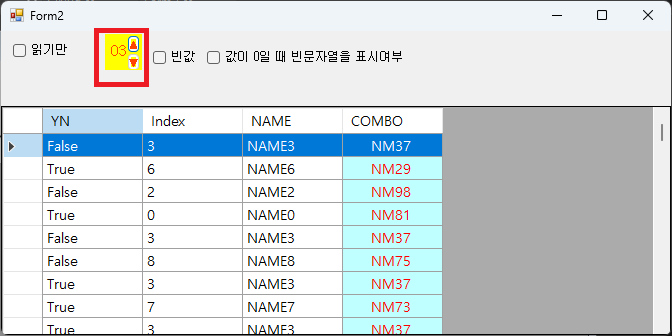
2. 테스트 프로그램 실행 결과
'유용한 정보' 카테고리의 다른 글
| [C#] DataGridView Header Cell Merge (0) | 2026.03.31 |
|---|---|
| [C#] DataGridView에서 콤보박스 컬럼을 사용하기 (2) | 2025.06.24 |
| [C#] ComboBox의 DataSource에 DataTable을 연결하여 사용하기 (0) | 2025.06.15 |
| [C#] DataGridView의 짝수행과 홀수행을 다르게 지정하는 방법 (0) | 2025.06.03 |
| [C#] DataGridView에서 DataSource 연동하는 방법 (0) | 2025.05.24 |